Integration | workflow FIA
To calculate concentrations and check the kit performance, FIA MS data needs to be integrated. Before performing an integration, upload or load MS data then define the integration window as described below.

Recommended workflow | adjust integration windows
Define integration windows using QC2
- Select a QC2 sample from the plate run, e.g. QC2 on well 50.

- Left-click once on the left and right sides of the FIA signals to define the integration range.
Alternatively, the inegration boundaries can be set by manually typing in the start ("from") and end ("to") times.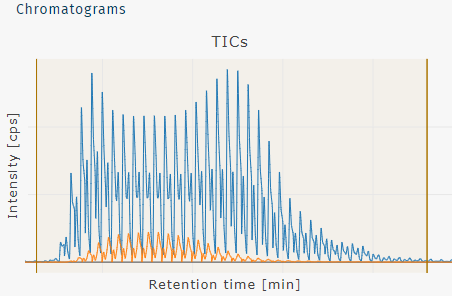

- The Threshold is set automatically for each kit to minimize false signals. Intensities below the set threshold will be filtered and show "< Threshold" in the results. In most circumstances, this wican be left as the default.
Since FIA does not have retention times like the LC part, only a single integration window is defined for the entire plate run.
The shape and appearance of the FIA profile may appear different depending on the kit and instrument in use. It may appear as a continuous peak or show the individual scans as in the above screenshot.
Integrate FIA plate run
Click Integrate to perform the integration procedure.

The progress is indicated as a blue bar at the upper left edge of the screen.

Next steps, if LC data was already integrated
To integrate data from an FIA plate run, either