Validation | features
Quality assessment
For an easy quality assessment of a kit run, validation statuses are given on metabolite, well/injection, and plate run levels.
- Quality assessment is sample type and analyte classification (T1 or T2) specific.
- "Excluded" metabolites, injections, or wells are not used for quality assessment.
Classification levels
- Metabolite: a calculated concentration for a metabolite is evaluated.
- Injection: all concentrations of an injection are evaluated.
- Well: all injections from one well are evaluated. If only one injection per well was performed, injection level = well level.
- Plate run: all wells of one plate run are evaluated.
Custom QC: "QC" and "Custom QC" samples are grouped under the term "QC".
Metabolite level
Calibration standard acceptance criteria
 accuracy within kit acceptance criteria, in general 70-130%
 accuracy not within kit acceptance criteria, in general 70-130%
QC sample acceptance criteria
- Accuracy calculated exclusively for metabolites of analyte classification "T1".
- CV calculated exclusively for metabolites of QCs and of analyte classification "T1" or "T2".Requirement: at least three QC replicates per plate run and concentration above LOQ.
- accuracy within kit acceptance criteria, in general 70-130%, and CV below 20% (analyte classification T1) or below 30% (analyte classification T2)
- accuracy not within kit acceptance criteria, in general 70-130%
 CV above 20% (analyte classification T1) or above 30% (analyte classification T2)
Well/injection level
Well/injection status is , if
and . 
For this evaluation, Valid means for
- T1 metabolites do not have Accuracy ot ouf range or CV out of range,
- T2 metabolites do not have CV out of range.
Plate run level
Plate run validation requirement: at least three QC replicates of one level per plate run.
For plate run validation, QCs are exclusively used.
- OK if at least 67% of all wells per plate run have a well status
- Not OK if less than 67% of all wells per plate run have a well status

Valid well status means QC samples do not have CV out of range or Accuracy out of range, as described in Well/injection level.
Exclude metabolite, well, sample type, or plate run
A metabolite, sample, well, or plate run can be excluded from analysis. This may be required for issues during preparation or data collection, e.g. when a sample was pipetted incorrectly onto one well position or the incorrect retention time (RT) was defined for one metabolite in the corresponding acquisition method.
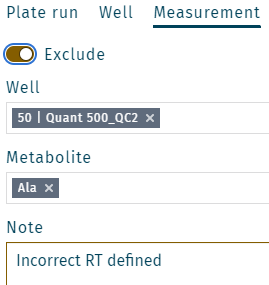
Exclude a metabolite
- Select a well, e.g. QC2 on position E2.

- Right click on a metabolite, e.g. Ala.

- Add a note (e.g. "Incorrect RT defined") and click Save.
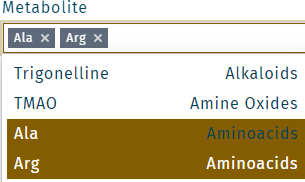
Multiple metabolites can be selected. Click in the field Metabolite. Make a selection, and click Save.
Exclude a well
- Right click on a well, e.g. QC2 on position E2.

- Add a note (e.g. "Incorrect pipetting") and click Save.

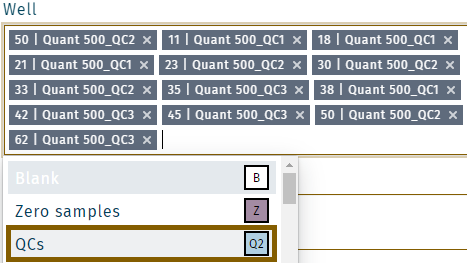
- Multiple wells can be selected. Click in the field Well. Make a selection, and click Save.

- Samples from the same type (e.g. all QCs) are selected by selecting QCs.
Exclude a plate run
- Above the plate, click Exclude.

- Add a note (e.g. "Kit run failed") and click Save.

Add notes
Notes can be added on metabolite, well, or plate run level.
- Select a metabolite or well and right click, e.g. QC2 on position E2.

- Add a note and click Save.

- Plate notes can be added, by right click on
 .
. 
Multiple metabolites or wells can be selected. Click in the field Metabolite or Well, make a selection, and click Save.
Validation criteria are only given if not described in section Validation statuses.